Free Download for Windows

View an ad to download for free

Efficient Image Conversion Tool for Windows

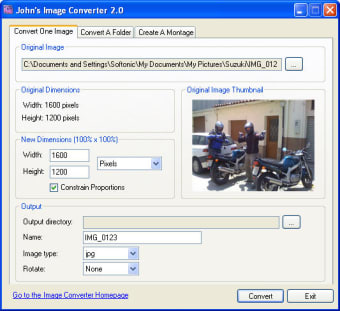
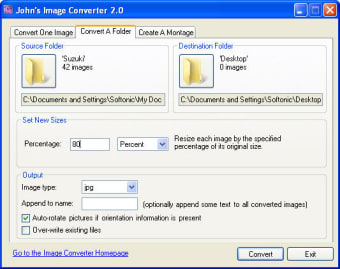
John's Image Converter is a free software application designed for Windows users, specifically catering to the needs of photography enthusiasts. This program allows users to easily convert various image formats, making it an essential tool for anyone looking to manage their photo collections effectively. With its user-friendly interface, it simplifies the process of converting images, ensuring that even beginners can navigate through its features without difficulty.

Unlock your creativity with Adobe Stock

Get 10 images or 1 video with a free trial

The software supports multiple image formats, providing flexibility and convenience for users who require different output types. Whether you need to convert JPEGs to PNGs or other formats, John's Image Converter streamlines the task, saving time and effort. Overall, this program is a valuable addition to any multimedia toolkit, especially for those focused on photography.


 0/4

App specs

  • Developer

  • License

    Free

  • Version

    2.0

  • Latest update

  • Platform

    Windows

  • OS

    Windows 2003

  • Language

    English

  • Downloads

    6.7K

    Last month's downloads

    • 5
  • Size

    454.03 KB

Program available in other languages


Icon of program: John's Image Converter

John's Image Converter for PC

  • Free
  • 4.1
    27
  • 6.7K
  • V2.0
Free Download for PC

View an ad to download for free


User reviews about John's Image Converter

4.1

1 reviews

Add review

Main reviews for you

  • Anonymous user

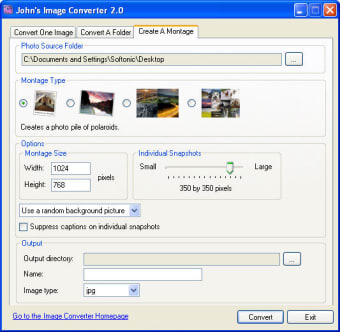
    My review. For me this app is very usefull if you want to make collages or change resolution of images in only few clicks Pros: -easy to use Cons: -if you make custom collages you always have to give them a new name. The aplication cant add the numers to the end of the file.

More

You may also like

Alternatives to John's Image Converter

Explore Apps

Latest articles

Laws concerning the use of this software vary from country to country. We do not encourage or condone the use of this program if it is in violation of these laws.
Softonic

Is John's Image Converter safe?

100/100

Score result: Clean

This file passed a comprehensive security scan using VirusTotal technology. It is safe to download.

  • Virus free
  • Spyware free
  • Malware free
  • Verified by Security Partners

    VirusTotal logo

Scan Info

Last scan
Friday, December 22, 2023
Scan provider
VirusTotal · Full report

File Integrity

File
ImageConverterSetup20.exe
SHA256
5505c32fdafe83244e782cf6e740ff4dd4dfd9eb860055149941835899b395c8
SHA1
7a3b2cfa36078ff9d44bddcf8cde0f961920276f

Softonic security commitment

John's Image Converter has been thoroughly scanned by our advanced security systems and verified by industry-leading partners. This file comes from the official developer and has passed all our security checks, showing no signs of viruses, malware, or spyware. For more information, visit our Security and Trust Center

Signed in to Softonic as